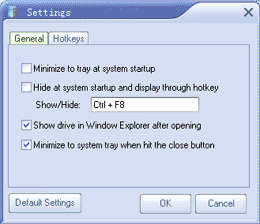
Advanced Settings – General Tab :
 | Minimize to the tray at system startup : |
| Check this box if you want Private Disk to minimize to tray when Windows starts up. |
| Hide at system startup and display through hotkey : |
| Allowing the user to run the program completely hidden to prevent other snoopers from even knowing it exists. |
| Show drive in Window Explorer after opening : |
| The disk can be set up to be automatically explored in Windows Explorer after it has been opened. |
| Minimize to system tray when hit the close button : |
| You can allow Control Panel to minimize when you click the “Close” or “Exit” buttons. Set the “Minimize to system tray when hit the close button” flag to allow minimizing. |